eKYC with Ollama & LLM Multi-modal Model OCR & DeepFace on Colab
목차
- 개요
- eKYC란?
- 경량 LLM 멀티모달 모델
- DeepFace
- 로컬 터널링 서비스 Localtunnel
- Demo 구현
개요
Google Colab에 Ollama 와 local LLM Vision 모델 및 DeepFace 라이브러리를 이용해서 eKYC 데모를 만들어 보겠습니다.
chatGPT와 같은 Public LLM 모델을 사용해도 되지만, 고객 신분증 및 사진과 같은 민감한 고객정보를 다루는 경우 Public LLM을 사용하기에는 제한(보안)이 따르기 때문에 local LLM으로 구현이 필요합니다.
eKYC란?
eKYC(Electronic Know Your Customer, 전자 고객 확인)는 고객의 신원을 디지털 방식으로 확인하는 자동화된 프로세스를 의미합니다. 전통적인 KYC(Know Your Customer) 프로세스가 물리적 문서(예: 신분증, 주소 증명)를 요구하고 대면 확인을 포함할 수 있는 반면, eKYC는 온라인 채널과 디지털 기술을 활용해 원격으로 신원 확인을 수행합니다. 이는 금융 기관, 통신사, 전자상거래 플랫폼 등 다양한 산업에서 사용되며, 자금 세탁 방지(AML) 및 테러 자금 조달 방지(CTF) 규정을 준수하는 데 필수적입니다.
주요 특징
1.디지털 신원 확인:
- 고객이 웹 포털이나 모바일 앱을 통해 신분증 사진, 셀카(얼굴 인식용) 등을 제출합니다.
- OCR(광학 문자 인식) 기술로 문서 데이터를 추출하고, 생체 인식(예: 얼굴 인식)으로 본인 여부를 확인합니다.
- 정부 데이터베이스, 신뢰할 수 있는 제3자 데이터 소스(예: Aadhaar in India)와 연동해 정보를 검증합니다.
2. 전통적 KYC와의 차이점:
- 속도: eKYC는 몇 분 내로 신원 확인을 완료할 수 있으며, 전통적 KYC는 며칠에서 몇 주가 걸릴 수 있습니다.
- 편의성: 물리적 방문이나 문서 우송 없이 온라인으로 완료.
- 효율성: 자동화로 인적 오류 감소 및 비용 절감.
- 보안: 생체 인식, 일회용 비밀번호(OTP), 블록체인 기술로 보안 강화.
3. 주요 기술:
- 생체 인식: 얼굴, 지문, 음성 인식.
- AI 및 머신러닝: 문서 위조 탐지, 위험 프로파일링.
- 블록체인: 데이터 보안 및 개인 정보 관리.
- 데이터베이스 연동: 공공 레지스트리, 제재 리스트, PEP(정치적 주요 인물) 목록 확인.
eKYC의 이점
- 고객 경험 개선: 빠르고 간편한 온보딩으로 고객 이탈률 감소.
- 비용 절감: 수동 처리 및 물리적 문서 관리 비용 감소.
- 규제 준수: AML, CTF, 데이터 보호법(GDPR, eIDAS 등) 준수.
- 사기 방지: 디지털 흔적(IP 주소, 타이핑 속도 등)과 생체 인식을 활용해 신원 도용 및 사기 위험 감소.
- 확장성: 대규모 고객 온보딩에 적합.
eKYC의 예시
- 인도: Aadhaar 기반 eKYC로 은행 계좌 개설 및 SIM 카드 등록이 몇 분 내 완료. 인도 성인의 99.9%가 디지털 ID를 보유.
- 은행: 고객이 모바일 앱으로 신분증과 셀카를 업로드해 계좌 개설.
- 통신사: SIM 카드 활성화 시 eKYC로 신원 확인.
- 헬스케어: 환자 신원 확인 및 의료 기록 정확성 보장.
한계 및 과제
- 데이터 보안: 민감한 개인 정보(생체 데이터, 신분증 정보) 유출 위험.
- 오류 가능성: 생체 인식의 오탐지(false positive/negative) 가능성.
- 규제 차이: 국가별 eKYC 규정 상이(예: 미국은 연방 차원의 eID 미보급).
- 기술 접근성: 디지털 기기나 인터넷 접근이 제한된 사용자의 배제 가능.
eKYC의 사용
금융기관 및 핀테크 기업이 eKYC를 활용해 계좌 개설, 대출 신청, 보험 가입 등을 간소화합니다. 예를 들어, 모바일 뱅킹 앱에서 주민등록증/운전면허증 스캔 및 얼굴 인식으로 신원 확인을 완료합니다. 인터넷 보급률 증가와 생체 인식 기술 발전으로 eKYC 채택이 증가하고 있습니다.
eKYC는 전통적 KYC를 디지털화해 속도, 편의성, 보안을 향상시킨 현대적 신원 확인 방식입니다. 금융, 통신, 헬스케어 등 다양한 산업에서 필수적이며, 특히 규제 준수와 사기 방지에 기여합니다. 다만, 데이터 보안과 기술 접근성을 고려한 지속적인 개선이 필요합니다.
경량 LLM 멀티모달 모델
최근 공개된 Gemma 3와 Granite 3.2 Vision 모델을 사용할 것입니다. 그래서 간단하게 주요 특징과 용도를 정리했습니다.
Gemma 3
- 개요: Google이 개발한 경량 오픈소스 멀티모달 모델로, Gemini 기술을 기반으로 합니다. 비전 변형(4B, 12B, 27B 파라미터)은 텍스트와 이미지를 처리하며, 이미지 설명, 질문 응답, 시각 이해 등의 작업을 지원합니다.
- 주요 특징:
- 멀티모달: 텍스트와 이미지를 처리하며, 128K 토큰 컨텍스트 창과 140개 이상의 언어를 지원.
- 효율성: 모바일 기기나 워크스테이션 같은 소비자 하드웨어에서도 실행 가능.
- 성능: 27B 모델은 Gemini-1.5-Pro와 경쟁하며, 요약, 추론, 코드 생성에서 강력한 성능.
- 구현: Hugging Face의 Gemma3ForConditionalGeneration과 AutoProcessor를 사용해 이미지 기반 작업(예: 이미지 설명, 텍스트 추출) 수행.
- 용도: 챗봇, 코딩 도우미, 연구 도구, 이미지 캡셔닝, 시각 Q&A 등 멀티모달 애플리케이션.
- 접근성: Hugging Face, Ollama, Google AI Studio에서 제공되며, 오픈 모델 가중치로 커스터마이징 가능.
Granite 3.2 Vision
- 개요: IBM이 개발한 2B 파라미터의 오픈소스 비전-언어 모델로, Apache 2.0 라이선스 하에 기업용으로 설계되었으며, 특히 시각적 문서 이해에 특화.
- 주요 특징:
- 문서 이해: 표, 차트, 인포그래픽, 텍스트 중심 레이아웃 등에서 콘텐츠 추출에 최적화, 강력한 OCR(광학 문자 인식) 기능 포함.
- 효율성: 소규모 모델로 빠른 성능과 낮은 비용 제공, 기업 애플리케이션에 적합.
- 훈련: 다양한 시각 데이터(폰트, 레이아웃, 차트)로 훈련되어 복잡한 문서 형식 처리 가능.
- 용도: 문서 처리 자동화, 재무 보고서, 송장, 프레젠테이션 데이터 추출, 기업용 AI 비서 구축.
- 접근성: Hugging Face, IBM watson.ai 등에서 제공되며, 오픈소스로 파인튜닝 가능.
비교
- 범위: Gemma 3 Vision은 텍스트와 이미지 작업을 위한 범용 멀티모달 모델이고, Granite 3.2 Vision은 문서 이해에 특화된 기업용 모델.
- 규모: Gemma 3는 최대 27B로 다양한 작업에 적합, Granite 3.2는 2B로 작고 효율적.
- 용도: Gemma 3는 다목적 AI 도구 개발에, Granite 3.2는 문서 분석이 필요한 비즈니스에 적합.
DeepFace
DeepFace는 얼굴 인식 및 분석을 위한 오픈소스 Python 라이브러리로, 딥러닝 기반의 다양한 얼굴 관련 작업을 지원합니다. 주로 신원 확인, 감정 분석, 속성 추출 등을 위해 사용되며, eKYC(전자 고객 확인)와 같은 애플리케이션에서 활용됩니다.
주요 특징
- 얼굴 인식: 두 얼굴 이미지가 동일인인지 확인(1:1 매칭)하거나, 데이터베이스에서 얼굴을 식별(1:N 매칭).
- 분석 기능:
- 감정 분석(예: 행복, 슬픔, 분노).
- 나이, 성별, 인종 추정.
- 얼굴 속성(예: 안경 착용 여부).
- 안티-스푸핑: 사진이나 영상으로 위조된 얼굴(스푸핑)을 탐지.
- 백엔드 지원: VGG-Face, FaceNet, ArcFace 등 여러 딥러닝 모델 지원.
- 효율성: 사전 훈련된 모델을 사용해 빠르게 구현 가능.
- 호환성: OpenCV, TensorFlow, PyTorch와 통합 가능.
주요 기능
- DeepFace.verify(): 두 이미지 간 얼굴 일치 여부 확인.
- DeepFace.analyze(): 감정, 나이, 성별 등 얼굴 속성 분석.
- DeepFace.stream(): 실시간 웹캠 스트리밍으로 얼굴 인식 및 분석.
- DeepFace.find(): 데이터베이스에서 얼굴 매칭.
용도
- eKYC: 금융 및 통신사의 신원 확인(예: 계좌 개설, SIM 등록).
- 보안: 출입 통제, 감시 시스템.
- 마케팅: 고객 감정 분석, 타겟팅.
- 헬스케어: 환자 신원 확인.
한계
- 정확도: 조명, 각도, 이미지 품질에 따라 결과가 달라질 수 있음.
- 프라이버시: 생체 데이터 처리로 인해 데이터 보호 규제(GDPR 등) 준수 필요.
- 리소스: 일부 모델은 GPU가 없으면 느릴 수 있음.
DeepFace는 얼굴 인식과 분석을 간편하게 구현할 수 있는 강력한 도구로, eKYC, 보안, 마케팅 등 다양한 분야에서 활용됩니다. 오픈소스라 커스터마이징이 가능하며, 사전 훈련된 모델로 빠른 시작이 가능합니다.
로컬 터널링 서비스 Localtunnel
Localtunnel의 용도
- 로컬 서버를 외부에서 접속할 수 있도록 해줍니다
- 외부 네트워크에서 로컬 PC에 접속할 수 있도록 해줍니다
Localtunnel의 사용법
- npm이 설치되어 있다면, npm install -g localtunnel을 실행합니다
- p는 포트를 지정하고, s는 서브도메인을 지정합니다
Localtunnel과 유사한 도구로는 ngrok이 있습니다
- ngrok은 공유기 포트 포워딩 설정보다 간단하게 외부 인터넷망에서 로컬 PC로 접속할 수 있도록 해줍니다
- ngrok은 애플리케이션을 실행하는 동안 HTTP 요청 로그를 확인할 수 있습니다
Demo 구현
Colab의 런타임유형을 하드웨어 가속기 T4 GPU로 변경합니다.
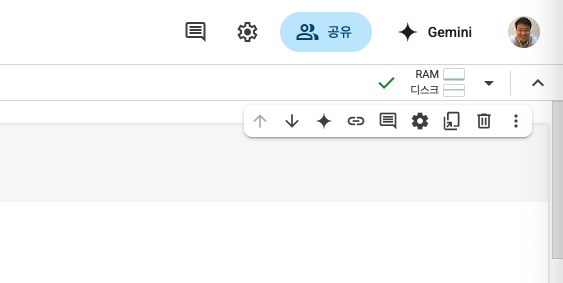
오른쪽 상단의 콤보박스를 클릭해서 "런타임 유형 변경" 매뉴로 들어갑니다.
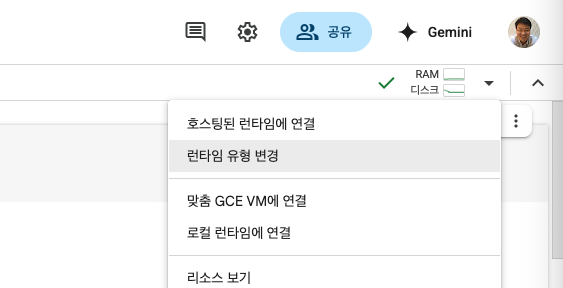
"런타임 유형 변경" 매뉴를 클릭하면, 아래 그림과 같이 "하드웨어 가속기"를 선택할수있습니다. 여기서 기본 설정인 CPU 대신 T4 GPU를 선택합니다.
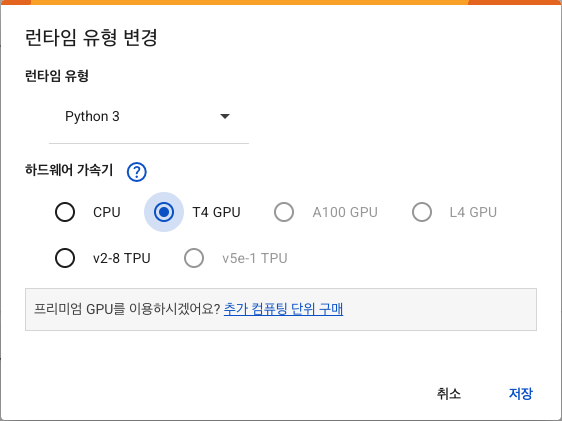
T4 GPU를 선택하면 기존 CPU 런타임 연결을 해제 및 삭제하고 T4 GPU 런타임 속성으로 세로운 세션을 시작합니다.
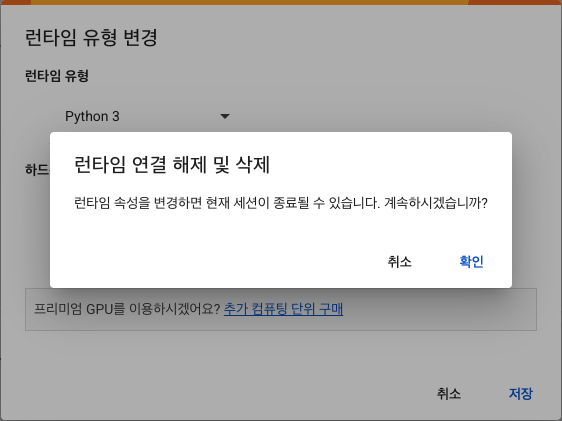
"확인" 버튼을 누르면 T4로 세로운 세션의 런타임이 구동됩니다.
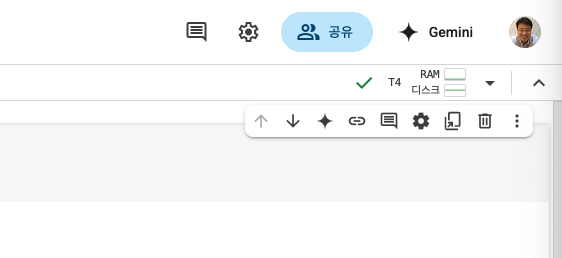
그럼, 순차적으로 새로운 런타임에 맞는 필요한 설정들을 시작합니다. 첫번째로 현재 작업디렉토리와 T3 GPU가 런타임의 GPU 옵션을 확인합니다.
# 현재 경로 확인
!pwd
!nvidia-smi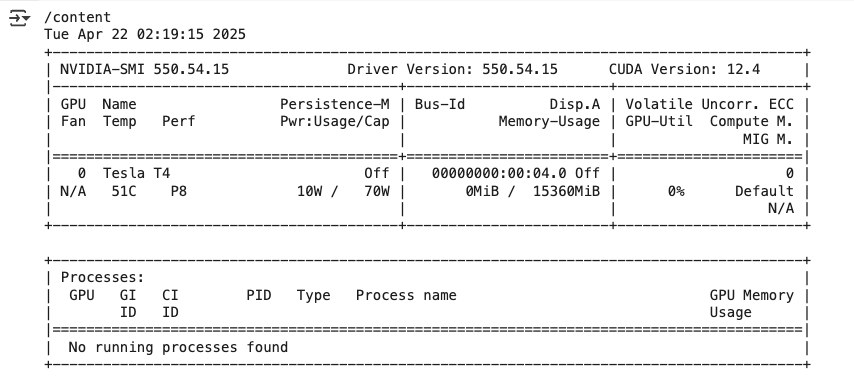
Colab에서 마운트된 디렉토리는 런타임이 연결해제되면 모든 파일들이 삭제됩니다. 반복된 작업을 위해서 별도의 Google Drive 디렉토리를 마운트해서 사용하면 런타임을 효율적으로 해제하고 다시연결해도 작업중인 파일들을 잃어버리지 않을수 있습니다.
# colab drive 마운트
from google.colab import drive
drive.mount('/content/drive')
다음과 같은 팝업으로 Google Drive엑세스 여부를 묻는다면 "Google Drive 연결"을 클릭하고 자신의 Google 계정을 선택해서 본인의 Google Drive로 연결합니다.
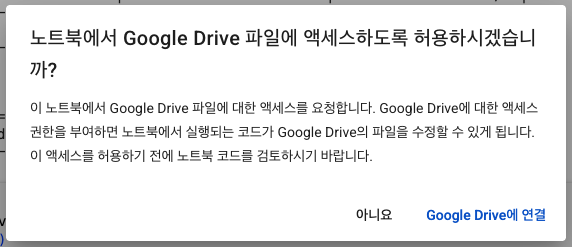
추가적인 3단계의 Google 계성선택 및 접속옵션을 선택하고 나면 "/content/drive"가 마운트됩니다.

미리 자신의 Google Drive에 만들어놓은 프로젝트 Directory로 Base 디렉토리 변경를 변경합니다.
## 작업 디렉토리로 이동 (chdir)
import os
os.chdir("/content/drive/MyDrive/ekyc_with_llm/")
현재 디렉토리를 확인해보고 디렉토리에 포함된 소스파일들을 확인합니다.
# chdir된 경로 및 파일확인
!pwd
!ls -al
저의 경우 로컬에서 개발하던 소스와 파일들을 Google Drive에 업로드 했습니다.

필요한 라이브러리를 설치합니다.
# 필요한 라이브러리 및 Ollama 설치
!curl -fsSL https://ollama.com/install.sh | sh
!pip install ollama
!pip install deepface
!pip install -q streamlit
!pip install -q streamlit_option_menu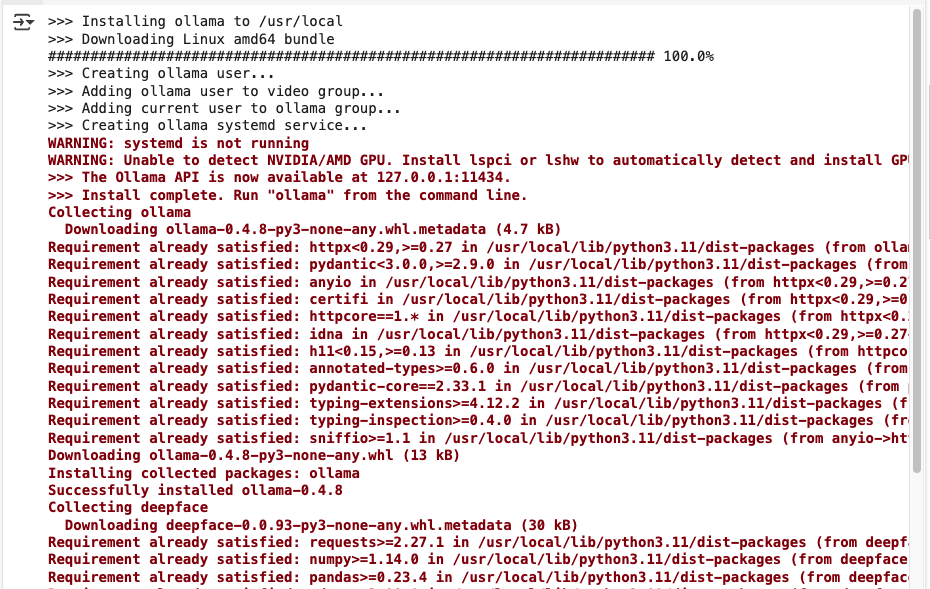
설치가완료되면 잘설치되었는지 pip 목록을 확인합니다.
!pip list | grep "ollama\|deepface\|streamlit"
필요한 라이브러리가 잘 설치되면 첫번재로 Ollama 서버를 백그라운드로 시작합니다.
# nohup을 사용하여 백그라운드에서 Ollama를 시작
!nohup ollama serve > ollama.log &
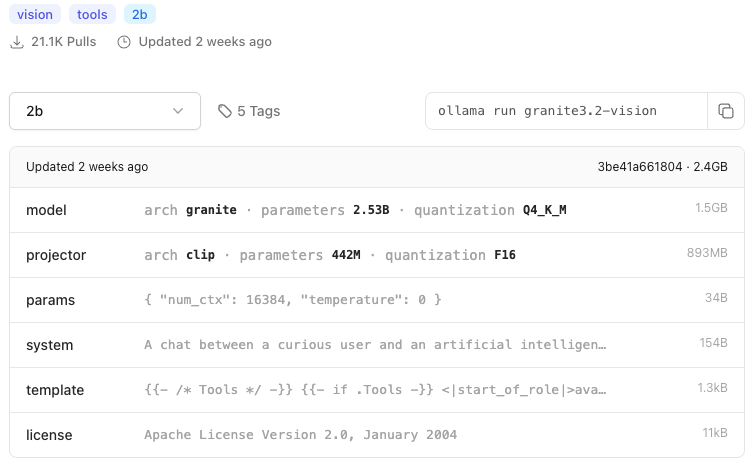
경량 멀티모달 모델 gemma3 4b와 granite3.2-vision 2b 모델을 받습니다.
!ollama list
!ollama pull gemma3:4b
!ollama pull granite3.2-vision
!ollama list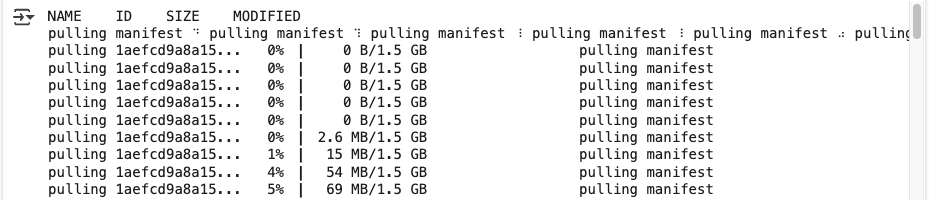
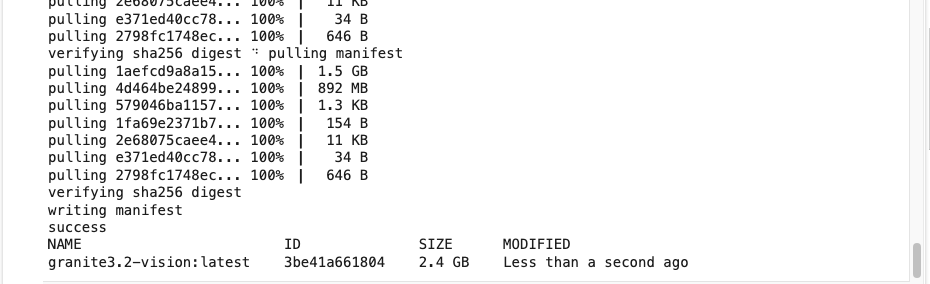
localtunnel을 설치합니다.
!npm install -g localtunnel
streamlit 을 백그라운드로 실행합니다.
!streamlit run app.py &>logs.txt &Collecting usage statistics. To deactivate, set browser.gatherUsageStats to false.
You can now view your Streamlit app in your browser.
Local URL: http://localhost:8501
Network URL: http://172.28.0.12:8501
External URL: http://34.125.235.113:8501
2025-04-22 03:20:36.026521: E external/local_xla/xla/stream_executor/cuda/cuda_fft.cc:477] Unable to register cuFFT factory: Attempting to register factory for plugin cuFFT when one has already been registered
WARNING: All log messages before absl::InitializeLog() is called are written to STDERR
E0000 00:00:1745292036.049572 4667 cuda_dnn.cc:8310] Unable to register cuDNN factory: Attempting to register factory for plugin cuDNN when one has already been registered
E0000 00:00:1745292036.057146 4667 cuda_blas.cc:1418] Unable to register cuBLAS factory: Attempting to register factory for plugin cuBLAS when one has already been registered
2025-04-22 03:20:36.081008: I tensorflow/core/platform/cpu_feature_guard.cc:210] This TensorFlow binary is optimized to use available CPU instructions in performance-critical operations.
To enable the following instructions: AVX2 AVX512F FMA, in other operations, rebuild TensorFlow with the appropriate compiler flags.
Streamlit 구동 포트를 localtunnel로 외부서비스 연결합니다.
!npx localtunnel --port 8501 & curl ipv4.icanhazip.com
아래 your url을 클릭하거나 복사해서 브라우져를 띄웁니다.

앞서 localtunnel을 띄울때 curl 명령으로 구동되는 서버의 외부 공용 IP를 가져왔는데 그 아이피를 Tunnel Password로 입력합니다.
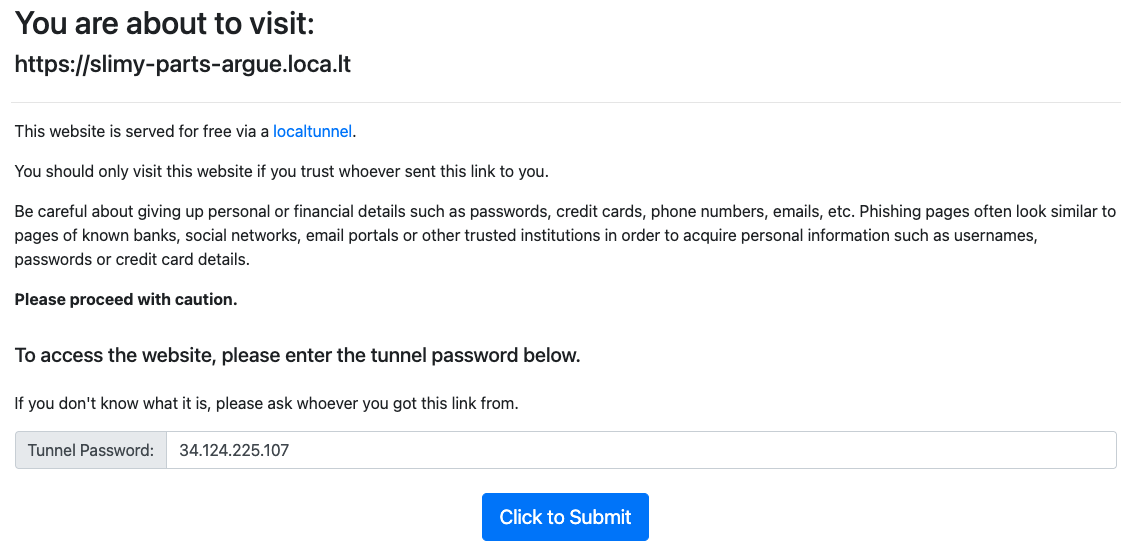
아이피를 복사해서 입력후 "Click to Submit" 합니다.

첫페이지인 ID Card를 등록페이지 입니다. 로컬파일등록 또는 사진으로 신분증을찍어서 업로드 할수있습니다.
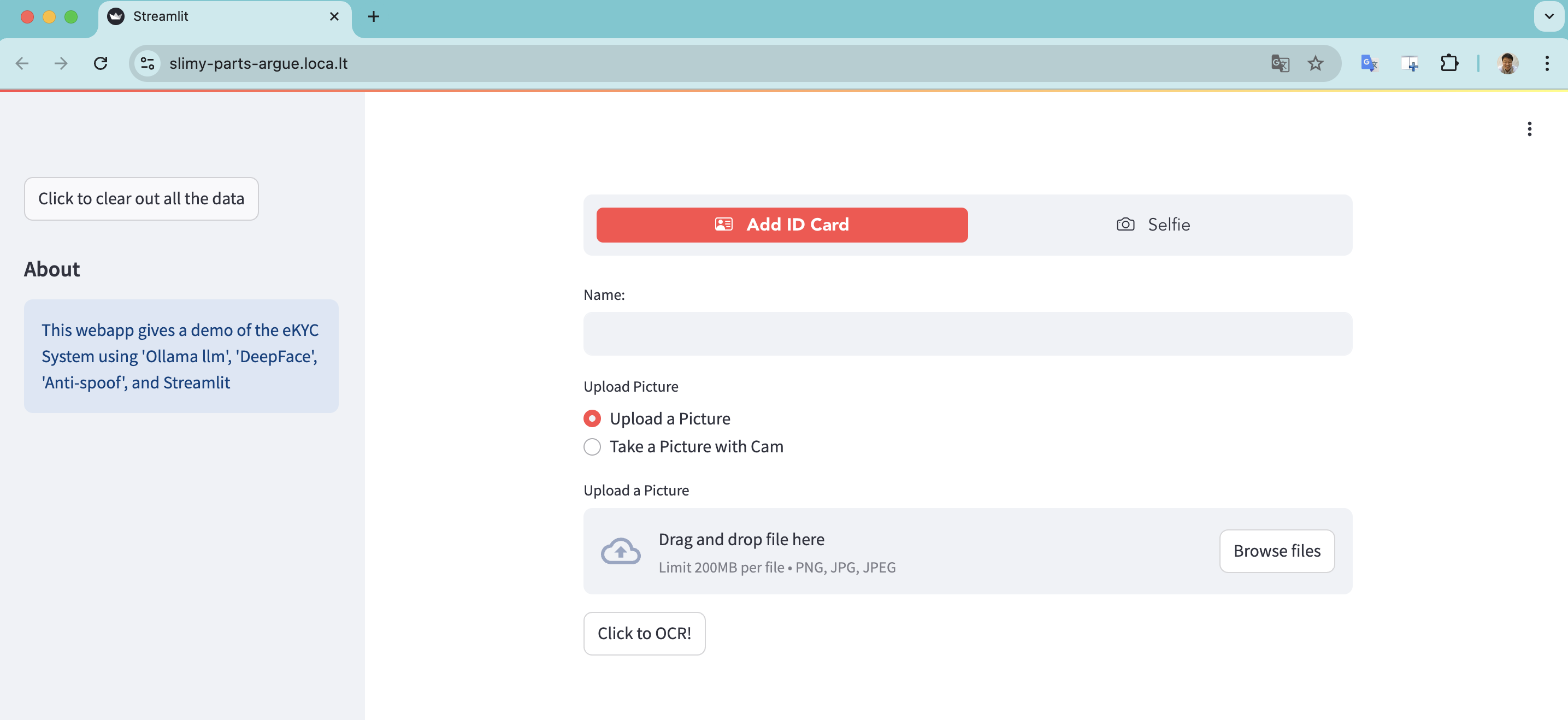
Browse files로 파일을 선택합니다.

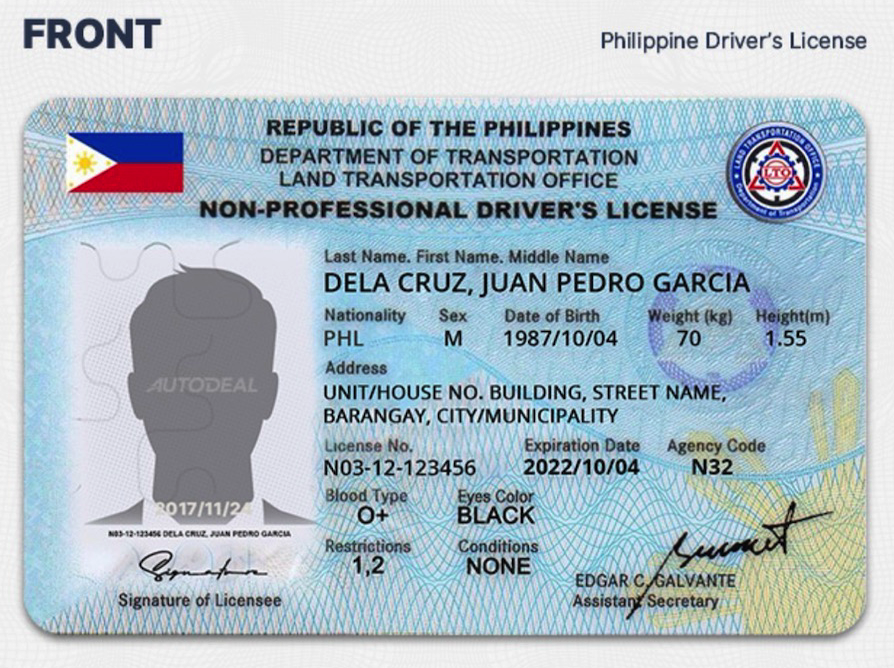
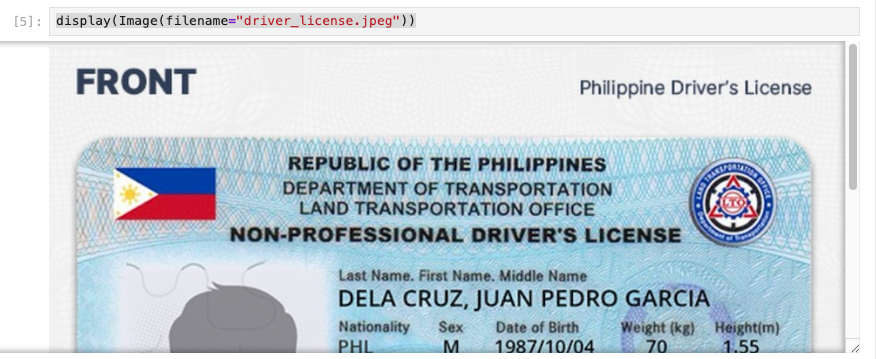
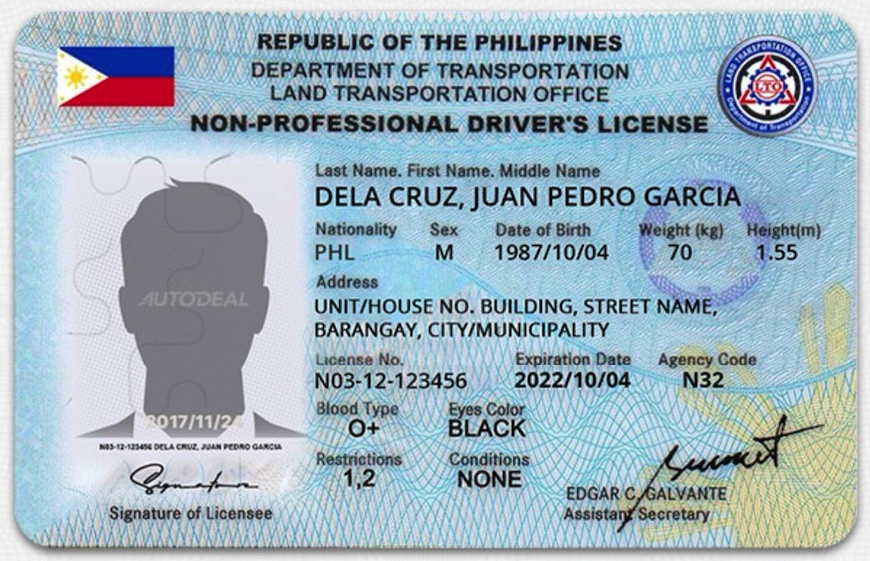
업로드한 신분증은 인터넷의 필리핀 일반 운전면허증(Driver's License) 에 제 사진을 복사해서 샘플로 만들었습니다.
악의적으로 신분증 위변조를 검사할수있는 방법도 구현해야할 항목중하나 입니다.
혹시 방법을 아신다면 댓글로 말씀해주시면 도움이 됩니다.
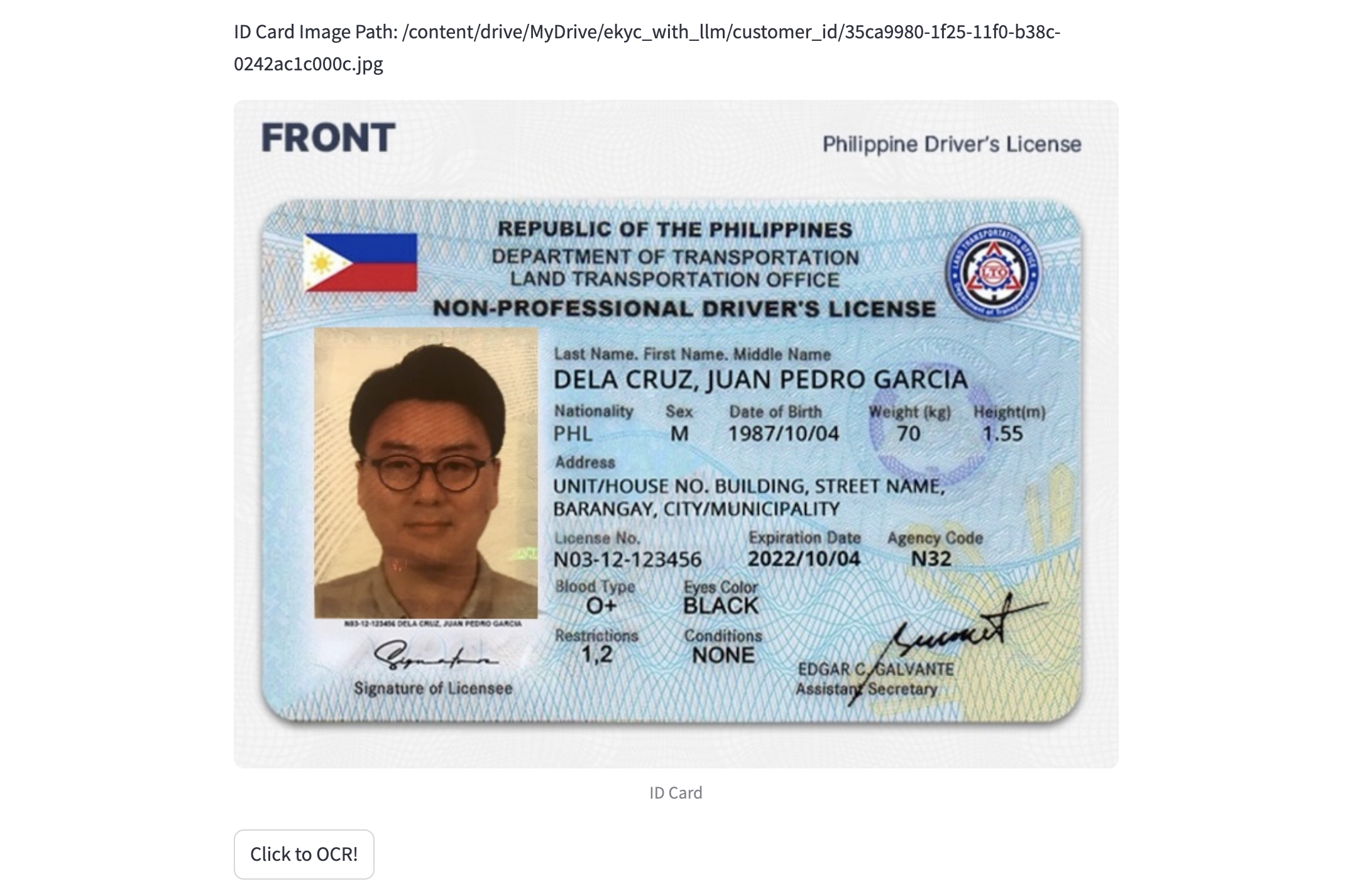
"Click to OCR!" 버튼을 누르면 신분증으로 OCR을 수행합니다.

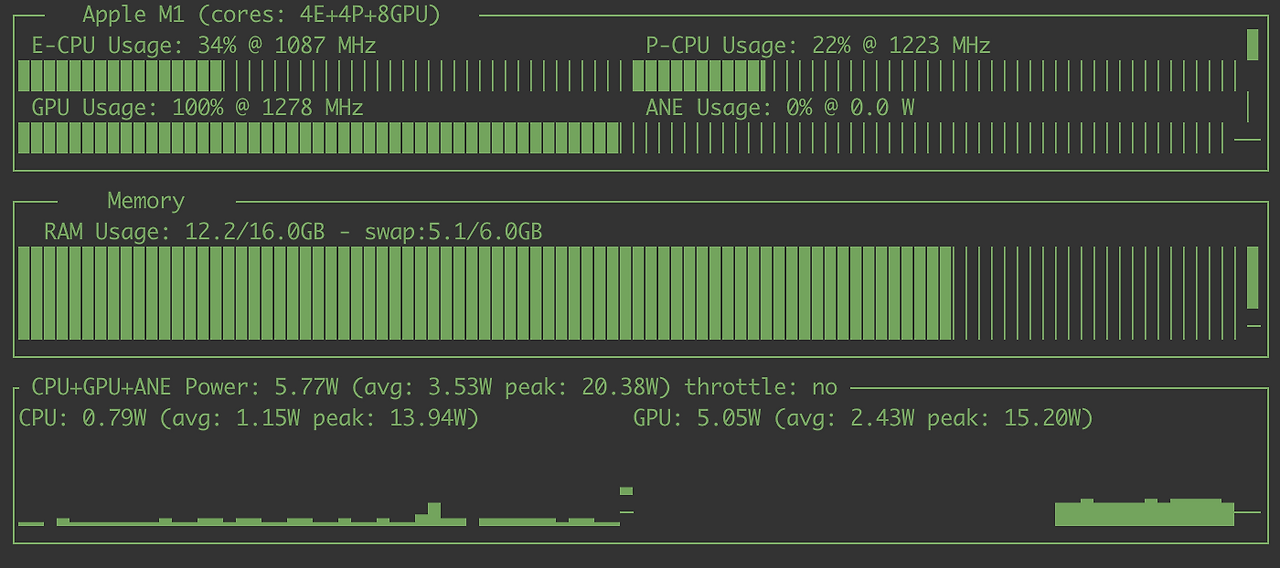
Google Colab T4 기준 10초 걸렸습니다. 개인 M1 으로 테스트했을때 첫번째 수행시 60 ~ 70초 정도 소요되었었는데 (두번째 부터는 2~30초) 확실히 T4가 빠릅니다.

운전면허증에 포함된 정보를 정확하게 추출해옵니다.
{
    "license": "Non-Professional Driver's License",
    "name": "DELA CRUZ, JUAN PEDRO GARCIA",
    "nationality": "PHL",
    "sex": "M",
    "dateOfBirth": "1987/10/04",
    "weight": "70",
    "height": "1.55",
    "address": "UNIT/HOUSE NO. BUILDING, STREET NAME, BARANGAY, CITY/MUNICIPALITY",
    "licenseNumber": "N03-12-123456",
    "expirationDate": "2022/10/04",
    "agencyCode": "N32",
    "bloodType": "O+",
    "eyesColor": "BLACK",
    "Restrictions": "NONE",
    "conditions": "1.2"
}
두번째로 Self 인증을 위해 본인사진을 찍도록합니다.
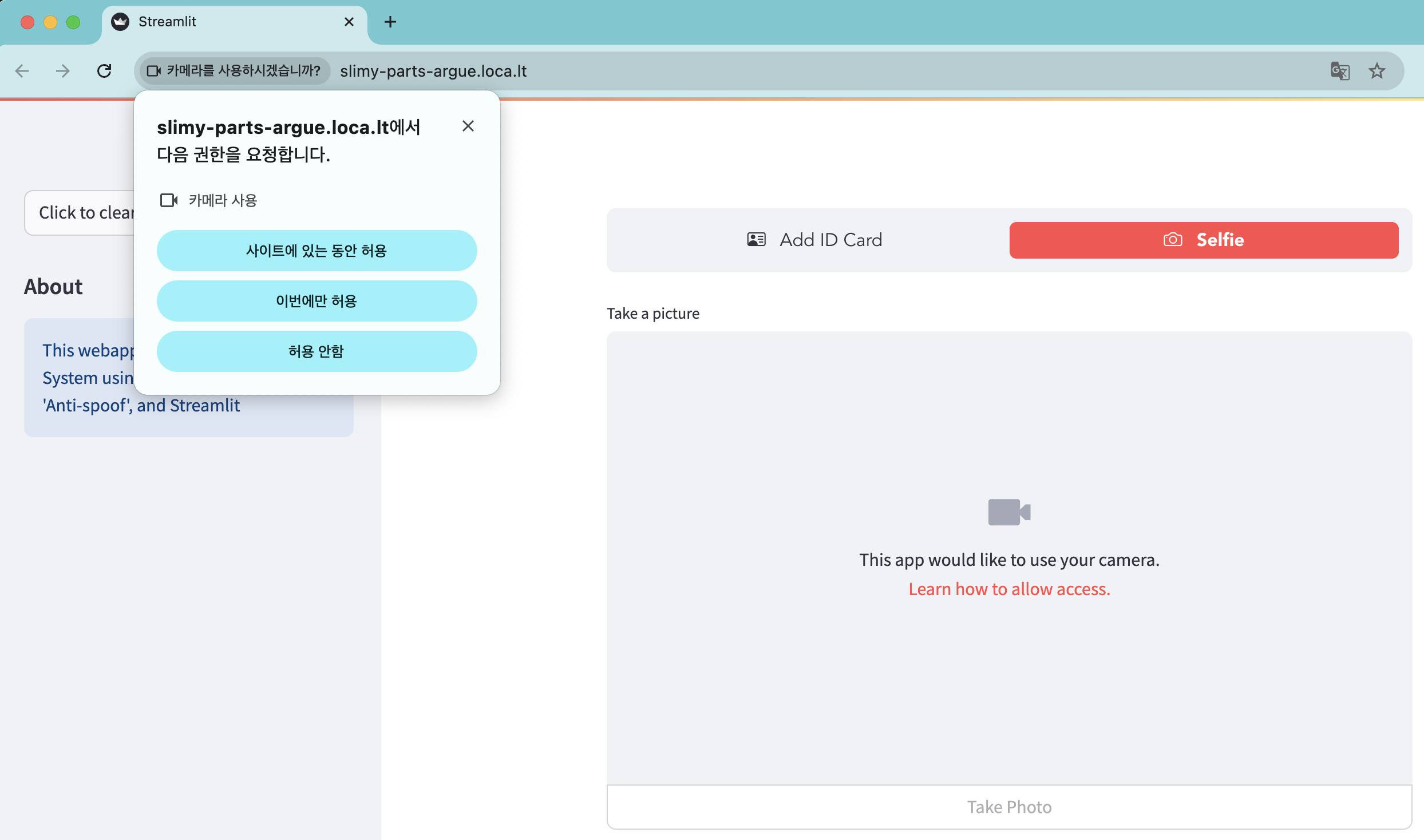
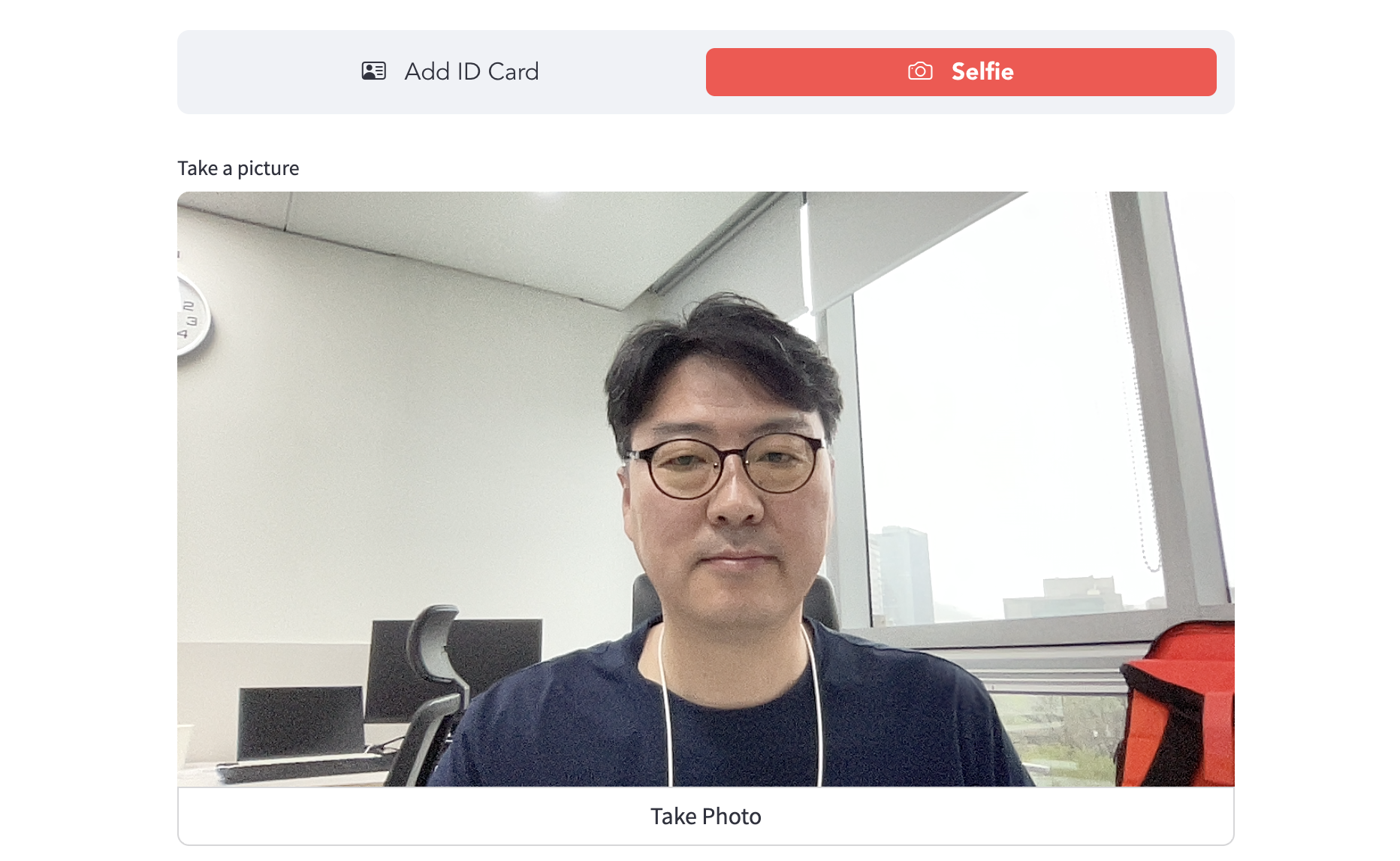
"Take Photo" 클릭하면 본인얼굴로 사진찍어 업로드되고 앞서 업로드한 신분증의 사진과 Selfie 사진을 비교하여 동일인지를 판단합니다.
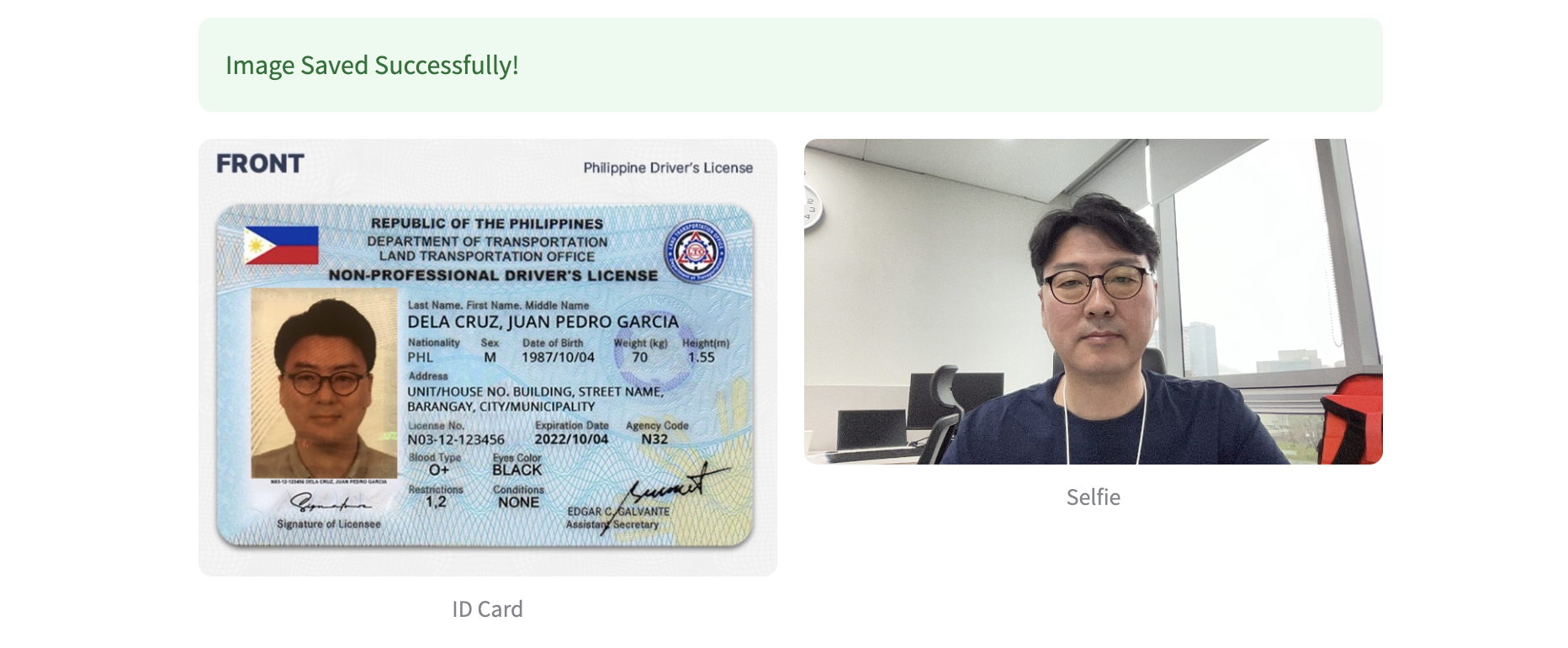
Verfification 결과 distance가 threshold값보다 작으면 유사도가 높은것으로 간주해서 "True"를 리턴합니다.
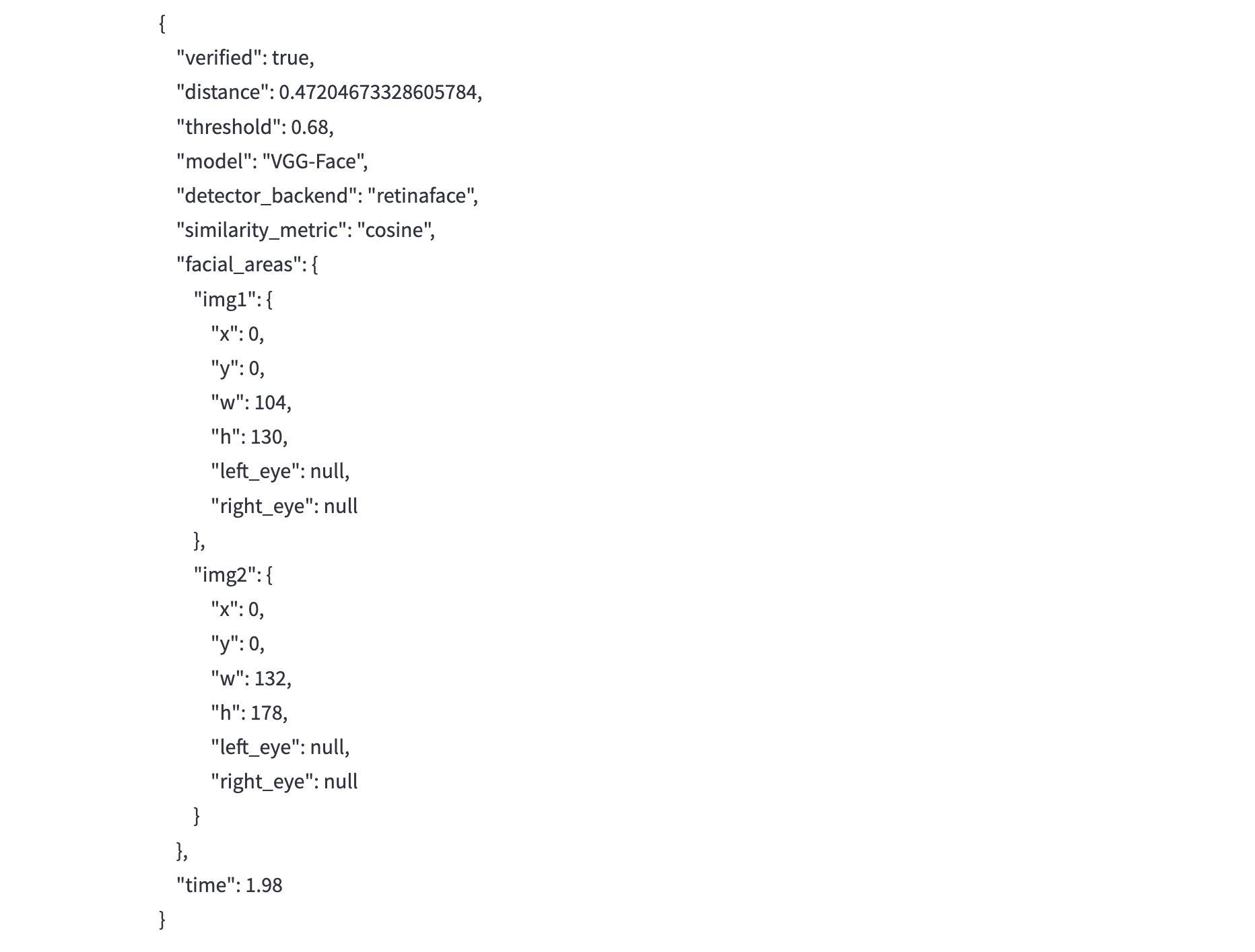
{
    "verified": true,
    "distance": 0.47204673328605784,
    "threshold": 0.68,
    "model": "VGG-Face",
    "detector_backend": "retinaface",
    "similarity_metric": "cosine",
    "facial_areas": {
        "img1": {
            "x": 0,
            "y": 0,
            "w": 104,
            "h": 130,
            "left_eye": null,
            "right_eye": null
        },
        "img2": {
            "x": 0,
            "y": 0,
            "w": 132,
            "h": 178,
            "left_eye": null,
            "right_eye": null
        }
    },
    "time": 1.98
}
이어서 추가할 기능
- 위조신분증여부 판단
- Face Anti-Spoofing
- UI에서 신분증 위치 인식 및 사각형표시 (별도 opencv 기능으로)
- Selfie에서 안면인식 및 타원표시 (별도 opencv 기능으로)
참고
Face Anti-Spoofing 안면 인식은 얼굴을 통해 사람을 식별하거나 특정인의 신원을 인증하는 방법
st.camera_input 사용자의 웹캠에서 사진을 반환하는 위젯을 표시
'AI > Multimodal' 카테고리의 다른 글
| [eKYC] M1 LLM & OCR & granite3.2-vision (0) | 2025.02.24 |
|---|---|
| Granite Vision 3.2 2B: 멀티모달로 전환되는 Granite (0) | 2025.02.24 |
| [eKYC] DeepFace: 오픈소스 얼굴 인식(Facial Recognition) 라이브러리 (Github 번역 및 스터디) (0) | 2025.02.24 |